top of page

Our Mission: To provide a quality product in a timely manner with complete customer satisfaction.
301-733-9500 or 800-713-7823


Want to see your logo on the item of your choice?
Take a look at the instructions below and when you're ready, to try it out!

First, select your item, then click
New! 3D Designer below the item.

If you upload a file with a background, select the remove background completely option.
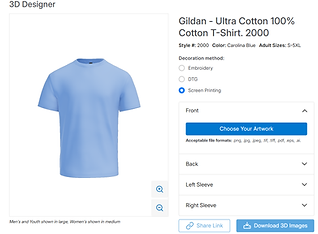
Next, select choose your artwork under the location you want the art on (front, back, or sleeves).

You can change the placement of the logo to your choice, and save the image when you are done.
Need help? Send us an email at
bottom of page